In the vast world of computers and the internet, data is like the blood that keeps everything running. Whether you are playing a game on a phone, ordering food through an app, or checking the weather, data is being moved from one place to another. However, for a long time, there has been a “language barrier” between different systems.
To solve this, we use formats like XML and JSON. If you have ever wondered why developers are moving away from the old ways and embracing the new, this guide is for you. We will break down everything you need to know about converting XML to JSON in the simplest way possible.
1. What Exactly is XML? (The Old Guard)
XML stands for Extensible Markup Language. Imagine a giant library where every book has a specific sticker telling you the title, the author, and the year it was printed. XML works just like those stickers. It uses “tags” to define what the data is.
For example, if you wanted to describe a toy, XML would look like this:
<toy>
<name>Racing Car</name>
<color>Red</color>
</toy>
XML was the king of data for a long time because it is very organized. However, as the internet got faster, XML started to feel a bit “heavy” and slow. It takes up a lot of space because you have to write every tag twice (once to open it and once to close it).
2. What Exactly is JSON? (The New Favorite)
JSON stands for JavaScript Object Notation. Think of JSON as the cool, younger brother of XML. It is much thinner, faster, and easier to read. Instead of using bulky tags, JSON uses simple brackets and colons.
The same toy from the example above would look like this in JSON:
{ “toy”: { “name”: “Racing Car”, “color”: “Red” } }
As you can see, there is much less “clutter.” This is why almost every modern app, from Instagram to Spotify, uses JSON to talk to its servers.
3. Why Should You Convert XML to JSON?
You might ask, “If XML works, why change it?” Here are the main reasons why converting your data to JSON is a smart move:
A. It is Much Faster
Because JSON uses fewer words and symbols, the file size is smaller. In the world of the internet, smaller files mean faster loading times. If your website or app is fast, users stay; if it is slow, they leave.
B. Computers Love JSON
Modern programming languages, especially JavaScript (which runs almost every website), can understand JSON instantly. XML requires a “translator” (called a parser) that takes extra time and memory to work.
C. Human Readability
Even if you aren’t a computer expert, you can look at a JSON file and understand it. It looks like a simple list. XML, with all its < > / symbols, can give you a headache if the file is too long!
4. XML vs. JSON: The Great Comparison
To help you understand the differences at a glance, let’s look at this comparison table:
| Feature | XML | JSON |
| Simplicity | Complex and bulky | Simple and clean |
| Speed | Slower to process | Very fast |
| Data Size | Large | Small |
| Readability | Hard for humans | Easy for humans |
| Usage | Older systems, Banking | Modern Web & Mobile Apps |
5. How to Convert XML to JSON (The Easy Way)
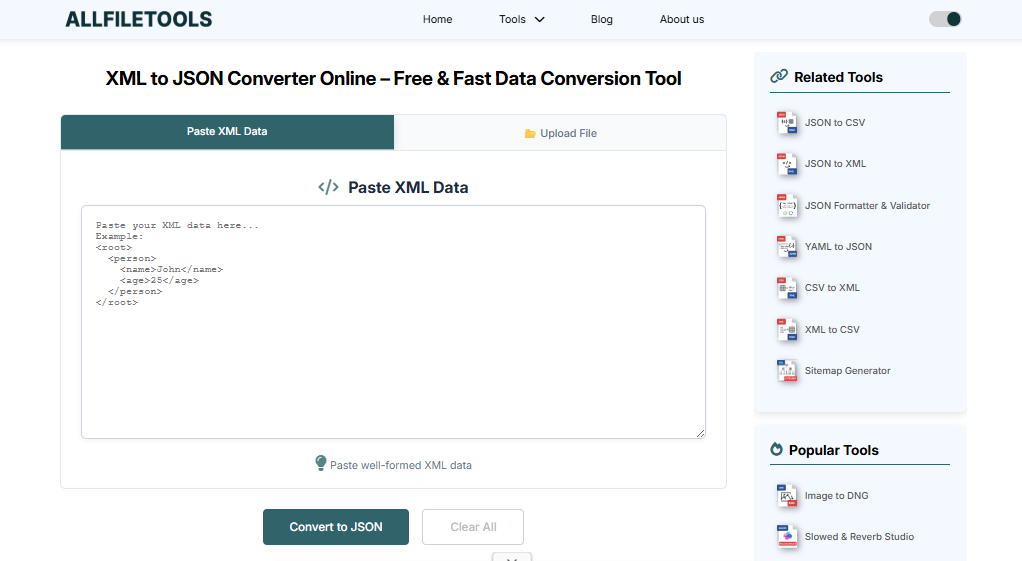
You don’t need to be a genius to convert these files. There are three main ways to do it:
Method 1: Using Online Converters (Best for Beginners)
There are many free websites where you can simply “copy and paste.”
- Copy your XML code.
- Go to a site like XML to JSON converter (or any top-rated converter).
- Paste the code and click “Convert.”
- Download your new JSON file.
Method 2: Using Programming (For Developers)
If you are learning to code, you can use languages like Python or JavaScript. In Python, you can use a library called xmltodict. It turns the XML into a dictionary, which is then easily saved as JSON.
Method 3: Using Browser Extensions
If you work with data every day, you can install a Chrome or Firefox extension. These tools will automatically detect XML on a webpage and show it to you as a clean JSON list.
See also: Streamlining Technology with Efficient AIO Solutions
6. A Real-World Example: The Grocery Store
Let’s imagine you run a grocery store and you have a list of fruits.
The Old XML Way:
XML
<grocery_store>
<item>
<name>Banana</name>
<price>0.50</price>
<stock>100</stock>
</item>
</grocery_store>
The Modern JSON Way:
JSON
{
“grocery_store”: {
“item”: {
“name”: “Banana”,
“price”: 0.50,
“stock”: 100
}
}
}
Notice how the JSON version feels more like a direct note, while the XML version feels like a formal document. For a 4th grader, the JSON version is much easier to explain: “The fruit name is Banana, it costs 50 cents, and we have 100.”
7. SEO Tips for Data Conversion Topics
If you are posting this article on a blog, you want people to find it! Here is how to make Google happy:
- Use Clear Headings: Just like I used “Method 1,” “Method 2,” etc. Google likes structure.
- Keywords: Use words like “XML to JSON conversion,” “Why use JSON,” and “Data formats” naturally.
- Simple Language: Google now rewards content that is easy to read. Avoiding overly “robotic” words makes your article rank better.
- Mobile Friendly: Ensure your code snippets look good on a phone screen.
8. Common Mistakes to Avoid During Conversion
When you are moving data from XML to JSON, sometimes things get lost in translation. Watch out for these:
- Missing Attributes: XML can have “attributes” inside tags. JSON doesn’t have a direct version of this, so make sure your converter doesn’t delete them.
- Case Sensitivity: JSON is very picky about capital letters. Name and name are not the same thing!
- Broken Brackets: If you forget even one { or }, the whole file will stop working.
9. The Future: Is XML Dying?
Not exactly! While JSON is winning the popularity contest, XML is still used in very “serious” places like banks, government offices, and large-scale manufacturing. It is great for documents that need to be signed or verified for security.
However, for everything else—apps, websites, and games—JSON is the future. Learning how to convert between the two is a superpower in the modern world.
10. Conclusion
Converting XML to JSON is more than just changing a file format; it is about making data move faster and making it easier for humans to understand. Whether you use an online tool or write your own code, the goal is the same: Simplicity.
By choosing JSON, you are making your website faster, your apps smoother, and your life as a developer (or data enthusiast) much easier.🔹 Explore more powerful file conversion and online utilities at AllFileTools –
🔹 For technical support, digital solutions, and expert services, visit LetDigitalFly IT Services –
🔹 Discover additional career and productivity resources at Resume Slip Builder –